Guide To 10 Best Image Recognition Software (with AI Nudges)
Compare the 10 best image recognition software in 2026, including AI tools, features, use cases, and benefits to choose the right solution for your business.

The era of basic pixel tracking is over. Today, the most powerful image recognition software is driven by end-to-end workflow integration and sophisticated artificial intelligence. But as business leaders look to integrate these visual capabilities into their operations, a critical realization is emerging: not all AI is created equal.
Some platforms offer foundational, cloud-based APIs essentially the raw engine blocks that your internal engineering team must use to build an app from scratch. Other solutions offer ready-to-use, purpose-built platforms designed to solve specific operational bottlenecks immediately.
If your goal is to automate physical execution, digitize visual compliance, or conduct flawless field audits, you need to know exactly what kind of AI sits under the hood. In this guide, we break down the 10 best AI-powered image recognition software tools of 2026, helping you navigate between raw developer APIs and highly specialized tools like FieldAssist's IRIS (AI image recognition software).
Top Image Recognition Software (Quick Comparison Table)
Before diving into the detailed capabilities of each platform, here is a high-level comparison of the top 10 image recognition tools, the specific type of AI they utilize, and where they excel in a business environment.
The 10 Best Image Recognition Software Platforms
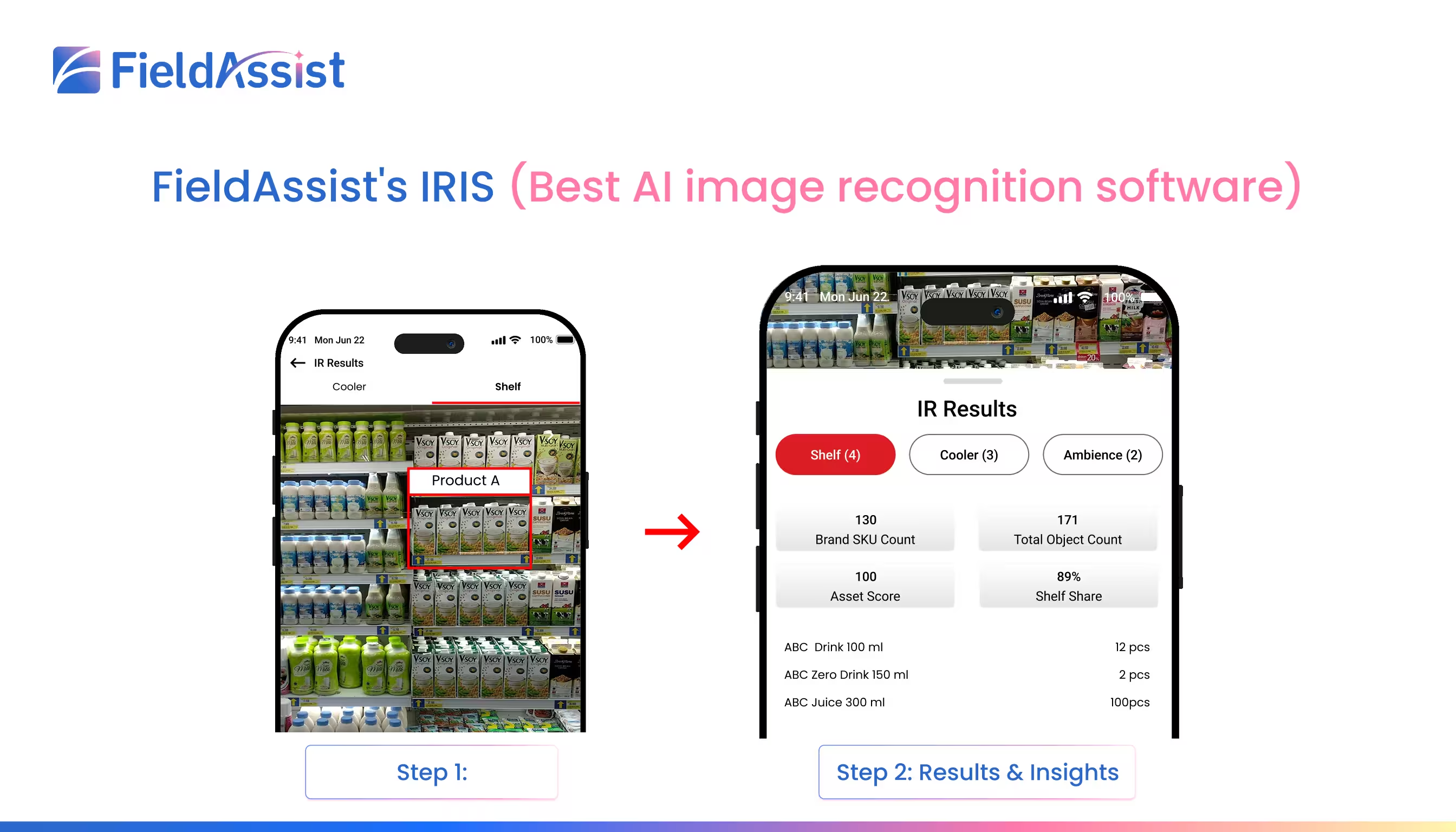
1. FieldAssist's IRIS (Best AI image recognition software)
Type of AI: Applied Edge AI & Deep Convolutional Neural Networks (CNNs)
Overview: FieldAssist's IRIS (AI image recognition software) is built explicitly as an out-of-the-box solution for enterprise field operations, visual compliance, and on-ground execution. Unlike generic developer APIs that require massive internal engineering resources to configure, FieldAssist's IRIS (AI image recognition software) provides an enterprise-ready platform trained specifically on the chaos of physical inventory, crowded display fixtures, and subtle packaging variations. By utilizing localized on-device processing, it allows field teams to capture and analyze dense visual setups in sub-second timeframes, turning everyday smartphones into powerful auditing tools.
Best For: Field teams, operations leaders, and commercial managers looking for automated visual auditing and compliance tracking without custom software development.
Key Features:
- Sub-Second Edge Inference: Processes image audits directly on mobile hardware without requiring continuous cellular connectivity.
- Fine-Grained SKU Differentiation: Accurately separates visually similar product variants, sizes, and lookalike packaging.
- Automated Layout Auditing: Identifies out-of-stock gaps, calculates spatial share, and scores visual compliance instantly.
Pros: Immediate operational deployment; works seamlessly offline; tightly integrated with field force workflows.
Best Used For: High-density inventory counting, planogram compliance auditing, competitive shelf analysis, and trade promotion validation where offline capability and SKU-level accuracy are mandatory.
2. Google Cloud Vision AI
Google Cloud Vision AI is a standard cloud-based API that developers use to add basic image analysis to their apps. It recognizes general categories of objects, reads basic text, and identifies common landmarks.
3. Amazon Rekognition
Amazon Rekognition is a service within AWS that provides image and video analysis. It is mostly known for processing video feeds and identifying faces or general activities within cloud environments.
4. Microsoft Azure AI Vision
Microsoft Azure AI Vision provides pre-built models for image analysis. It is designed to plug into existing Microsoft corporate networks to extract basic data from images or documents.
5. Clarifai
Clarifai is an end-to-end AI platform that helps organizations build, train, and deploy custom computer vision models. It covers the full lifecycle from raw data labeling and annotation to model training and deployment across unstructured visual data.
6. Roboflow
Roboflow is designed to simplify the computer vision pipeline for engineers. It provides tools to organize visual datasets, annotate images, apply data augmentation, and export trained models directly into production environments.
7. Trax
Trax is a well-established player in the visual intelligence space, utilizing computer vision to convert images of display fixtures and shelves into operational data points. It focuses primarily on measuring on-shelf execution for large enterprise brands.
8. Vispera
Vispera provides image recognition solutions designed to monitor and analyze physical display layouts. It utilizes deep learning algorithms to process visual inputs from both mobile devices and fixed overhead cameras to track product availability and spatial positioning.
9. Anyline
Anyline specializes in mobile data capture and optical character recognition. It allows mobile apps to scan and digitize text, serial numbers, barcodes, vehicle plates, and meter readings in real time using on-device processing.
10. Imagga
Imagga provides a suite of cloud-based APIs for automated image categorization, color extraction, content moderation, and visual search. It is frequently deployed to organize vast digital asset libraries by automatically tagging visual themes.
How to Choose the Best Image Recognition Software for Your Enterprise?
When evaluating enterprise-grade image recognition software, decision-makers must look beyond flashy product demos and laboratory accuracy scores. In real-world field operations, an algorithm’s success is determined by how seamlessly it integrates into existing distribution workflows, how quickly non-technical field representatives adopt it, and whether it delivers measurable business value without inflating total cost of ownership (TCO).
To make an investment that drives operational resilience and commercial scale, enterprise leaders evaluate solutions across 15 core evaluation pillars—ranging from end-to-end system integration with Sales Force Automation (SFA) and Distribution Management Systems (DMS) to on-device edge computing, model retraining agility, and dedicated post-deployment support.
The following 15 factors evaluation provides the exact questions to ask vendors and the strategic considerations required before committing capital:
Is the technology solving our biggest retail problem?
The most advanced computer vision platform isn't necessarily the right investment. Start with the business problem—availability, execution, compliance, pricing, or merchandising—and then choose the technology that solves it.
Differentiating Factors (What Sets FieldAssist IRIS Apart - Image Recognition)
Technology is only as valuable as the revenue it protects and the scale it enables. While generic visual APIs can identify basic objects in a controlled environment, physical distribution is a chaotic, high-velocity operation. FieldAssist’s IRIS (AI image recognition software) is engineered specifically to thrive in this chaos, closing the execution gap between head-office strategy and on-ground reality.
Here is a breakdown of the specific commercial problems IRIS solves, the AI-driven mechanics behind the solution, and the measurable business outcomes it delivers.
The Execution Problem: Blind Spots and Revenue Leakage
In traditional retail and distribution execution, commercial leaders face three massive blind spots:
- The Manual Audit Bottleneck: Field representatives spend up to 20 minutes manually counting SKUs and checking layouts. This self-reported data is slow, subjective, and highly prone to bias.
- Phantom Stockouts: High-demand products sit in the backroom instead of on the front-facing shelf, resulting in immediate lost sales at the point of purchase.
- Wasted Trade Spend: Millions are spent on prime shelf placement, end-cap displays, and promotional materials (POSM), but without real-time verification, execution compliance often falls below 50%.
How IRIS Solves Blind Spots and Revenue Leakage?
IRIS eliminates these blind spots by turning every field representative's smartphone into a digital execution engine.
- The "How": Instead of manually checking boxes, the field rep simply snaps a photo of the shelf. The IRIS instantly analyzes the image. It cuts through the visual noise of bad lighting, skewed angles, and overlapping products to identify individual SKUs, calculate exact spatial share, and measure planogram adherence.
- The AI Advantage: Because IRIS utilizes Edge AI inference, the heavy image processing happens instantly via mobile device. The system send a high-resolution photo to a cloud server and provide viable response. It processes the image in sub-seconds and instantly triggers corrective workflows (e.g., "You are missing 3 facings of the hero SKU; restock from the backroom now").
The Business Outcome: ROI by the Numbers
.avif)
When visual data is instantly converted into operational action, the commercial impact is rapid and measurable. This is one of may reasons to why image recognition software is becoming so important:
- +38% Increase in Planogram Compliance: By utilizing automated visual compliance scoring and forcing on-the-spot corrections, brands secure the premium shelf space they paid for.
- -45% Reduction in Audit Time: Reducing a 20-minute manual count to a 10-second photo scan reallocates thousands of field hours away from data collection and toward active relationship building and selling.
- 25% Faster Out-of-Stock Resolution: By triggering automated gap alerts directly to the Distribution Management System (DMS), stockouts are resolved in hours rather than days, directly lifting category revenue by an estimated 8% to 12%.
The Executive View: Where IRIS Differentiates the Most
To understand exactly why IRIS outpaces generic image recognition APIs, we must look at how its retail-trained AI modules deliver different operational realities in the field. Generic APIs just "see" objects; IRIS is engineered to understand commercial execution, seamlessly connecting visual data to your SFA and DMS workflows.
Here is how FieldAssist IRIS differentiates itself at the enterprise level:
Image Recognition Software FAQs
Here’s the answers to the most common questions people ask about image recognition software:
1. What are the system requirements for installing image recognition software?
System requirements typically depend on the deployment model your organization chooses. If you are building a custom solution using raw cloud APIs, you may need dedicated cloud infrastructure and high-bandwidth pipelines. However, for a purpose-built platform like FieldAssist IRIS, the footprint is minimal. It is engineered to run seamlessly on standard Android and iOS smartphones already used by your field teams, processing visual data locally on the device without requiring specialized hardware upgrades or dedicated in-house servers.
2. How quickly can we add new SKUs?
Adding new products or packaging updates typically takes just a few days, not months. Because the underlying AI is already trained to understand physical display environments, your team only needs to provide reference photos of the new item for the system to begin recognizing it accurately during rollouts.
3. Who maintains the product library after implementation?
FieldAssist handles the ongoing maintenance, accuracy tuning, and optimization of your visual library. Your team simply flags new or discontinued items, and our backend support team manages model updates and performance monitoring in the background.
4. Does it tell us what to do, or just what it sees?
It tells you exactly what actions to take. Instead of just delivering raw counts of what is on a display, FieldAssist IRIS connects directly to your field workflows. If a product is missing or misplaced, the system immediately flags the issue and can auto-generate a replenishment order or prompt the field rep to correct the arrangement on the spot.
5. Is IRIS solving our biggest retail problem?
Yes, if your biggest operational problems are lost revenue due to phantom out-of-stocks, poor planogram compliance, and a lack of competitive visibility. By replacing subjective, 15-minute manual audits with sub-second objective photo scans, IRIS closes the execution gap. It ensures that the capital you spend on trade promotions, marketing assets, and shelf-space agreements actually translates into flawless physical execution at the point of purchase.
6. Will it work in our worst stores?
Absolutely. IRIS is engineered specifically for the chaotic reality of physical distribution. The deep convolutional neural networks are trained to handle crowded display fixtures, skewed camera angles, partial occlusions (like a product hidden behind a price tag), and the harsh glare or dim lighting typical of traditional trade outlets. Furthermore, its offline edge-processing ensures the software functions perfectly even in concrete basements or rural stores with zero cellular connectivity.



%20(1).avif)